


Troubleshooting an infusion pump is a crucial skill for healthcare providers and those in the medical equipment supply business. As a supplier of infusion pumps, I've encountered various issues over the years and have learned effective ways to address them. In this blog, I'll share some common problems with infusion pumps and how to troubleshoot them.
Understanding the Basics of Infusion Pumps
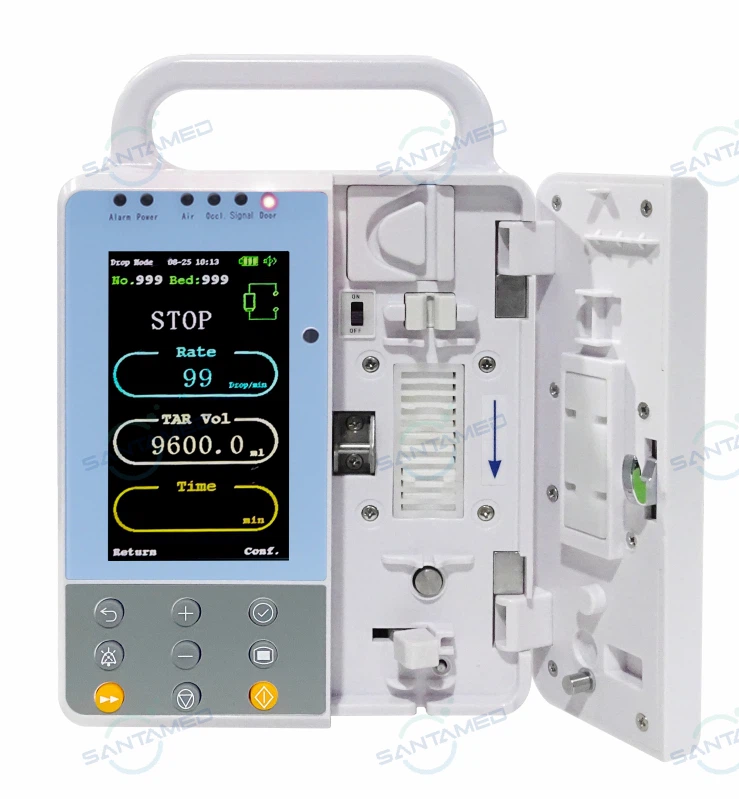
Before delving into troubleshooting, it's essential to understand what an infusion pump is and how it works. An infusion pump is a medical device that delivers fluids, such as nutrients and medications, into a patient's body in a controlled manner. There are different types of infusion pumps, including Medical Infusion Pump and Portable IV Infusion Pump. These pumps are designed to ensure accurate dosing and a consistent flow rate, which is vital for patient safety and treatment effectiveness.
Common Issues and Troubleshooting Steps
1. Alarm Activation
One of the most common problems with infusion pumps is the activation of alarms. Alarms can be triggered by various factors, such as occlusion, low battery, air in the line, or incorrect programming.
- Occlusion Alarm: This alarm indicates that there is a blockage in the infusion line. To troubleshoot, first, check the tubing for kinks or clamps that may be obstructing the flow. Ensure that the needle is properly inserted and not blocked. If the problem persists, try replacing the tubing.
- Low Battery Alarm: When the low battery alarm sounds, it's a sign that the pump's battery is running low. Connect the pump to a power source immediately. If the battery doesn't charge or the alarm continues, the battery may need to be replaced.
- Air in the Line Alarm: Air in the infusion line can be a serious issue as it can cause air embolisms. To resolve this, prime the tubing to remove any air bubbles. Make sure the drip chamber is filled to the appropriate level and that there are no air pockets in the tubing.
- Incorrect Programming Alarm: Double - check the programming settings on the pump. Ensure that the flow rate, volume to be infused, and other parameters are set correctly. If the settings are incorrect, reprogram the pump according to the doctor's orders.
2. Inaccurate Flow Rate
An inaccurate flow rate can lead to under - or over - dosing of medications or fluids, which can have serious consequences for the patient.
- Check the Tubing: The tubing may be damaged or of incorrect size. Ensure that the tubing is compatible with the pump and that there are no signs of wear or tear. Replace the tubing if necessary.
- Verify the Pump's Calibration: Over time, the pump may lose its calibration. Most infusion pumps have a calibration function. Follow the manufacturer's instructions to calibrate the pump. If the problem persists, it may be a sign of a more serious internal issue, and the pump should be sent for professional servicing.
- Assess the Medication or Fluid: Some medications or fluids may have a high viscosity, which can affect the flow rate. Check the compatibility of the medication with the pump and consult the pharmacist if necessary.
3. Display and Keypad Issues
Problems with the display or keypad can make it difficult to operate the pump and can lead to incorrect programming.
- Clean the Display and Keypad: Dirt, debris, or spills can cause the display to be unclear or the keypad to malfunction. Use a soft, damp cloth to clean the display and keypad. Avoid using harsh chemicals that may damage the pump.
- Check for Loose Connections: Loose connections between the display, keypad, and the pump's internal components can cause problems. Open the pump (if it's safe to do so and you're familiar with its internal structure) and check for any loose wires or connectors. Reconnect them if necessary.
- Software Update: Sometimes, display and keypad issues can be resolved by updating the pump's software. Check the manufacturer's website for the latest software updates and follow the instructions to install them.
4. Mechanical Failures
Mechanical failures can occur due to normal wear and tear or improper handling.
- Motor Problems: If the pump's motor is not working properly, it may not be able to deliver the fluids at the correct rate. Listen for any unusual noises coming from the pump, such as grinding or rattling. If you suspect a motor problem, stop using the pump immediately and contact the manufacturer or a professional repair service.
- Pump Mechanism Jams: The pump mechanism may jam, preventing the normal flow of fluids. Check for any foreign objects that may be blocking the mechanism. If possible, clear the jam according to the manufacturer's instructions. If the problem persists, the pump may need to be repaired or replaced.
Preventive Maintenance
To minimize the occurrence of problems with infusion pumps, it's important to perform regular preventive maintenance.

- Regular Cleaning: Clean the pump regularly according to the manufacturer's instructions. This helps to prevent the buildup of dirt and debris, which can cause mechanical and electrical problems.
- Battery Maintenance: If the pump uses a battery, follow the proper charging and storage procedures. Replace the battery at the recommended intervals to ensure reliable operation.
- Inspection: Regularly inspect the pump for any signs of damage, such as cracks in the housing, loose connections, or worn - out parts. Replace any damaged components promptly.
When to Seek Professional Help
While many problems with infusion pumps can be resolved through basic troubleshooting, there are times when professional help is needed.
- Persistent Problems: If you've tried all the troubleshooting steps and the problem still persists, it's time to contact the manufacturer's technical support or a professional repair service.
- Internal Component Failure: If you suspect that there is a problem with the pump's internal components, such as the circuit board or the motor, do not attempt to repair it yourself. This requires specialized knowledge and tools.
- Software or Firmware Issues: If the pump's software or firmware is causing problems and you're unable to resolve them through updates, seek professional assistance.
Conclusion
Troubleshooting an infusion pump requires a combination of knowledge, skills, and experience. As a supplier of infusion pumps, I understand the importance of providing our customers with the support they need to ensure the proper functioning of these critical medical devices. By following the troubleshooting steps outlined in this blog and performing regular preventive maintenance, healthcare providers can minimize the risk of problems and ensure the safety and well - being of their patients.
If you're in the market for high - quality infusion pumps or need assistance with troubleshooting, don't hesitate to reach out to us. We're here to help you find the right solutions for your medical needs and provide you with the support you deserve.
References
- Manufacturer's manuals for various infusion pumps
- Medical literature on infusion pump technology and troubleshooting


