


Hey there! As a supplier of syringe pumps, I'm super excited to share with you how to program a syringe pump. Whether you're a medical professional, a researcher, or just someone curious about these nifty devices, this guide is for you.
Understanding the Basics of a Syringe Pump
Before we dive into programming, let's quickly go over what a syringe pump is. A syringe pump is a device that precisely controls the flow rate of a fluid from a syringe. It's commonly used in medical settings for things like administering medications, as well as in research labs for accurate fluid delivery.
There are different types of syringe pumps out there. For instance, you've got the Portable Injection Syringe Pump, which is great for situations where you need to move around. And then there's the Medical Syringe Pump, designed specifically for medical applications.
Pre - Programming Checks
First things first, you need to do a few checks before you start programming. Make sure the syringe pump is properly connected to a power source. If it's a battery - powered one, check the battery level. A low battery can cause the pump to malfunction during operation.
Next, select the right syringe. The size of the syringe matters because it affects the accuracy of the fluid delivery. Most syringe pumps can accommodate a range of syringe sizes, but you need to input the correct size into the pump's settings later. Also, ensure the syringe is clean and free from any debris or air bubbles. You can tap the syringe gently to get rid of air bubbles and then expel a small amount of fluid to make sure the line is clear.
Step - by - Step Programming
1. Power On and Select Mode
Once you've done the pre - checks, power on the syringe pump. The display will light up, and you'll usually see a home screen. Here, you need to select the mode of operation. There are typically two main modes: infusion and withdrawal. Infusion is when you're pushing fluid out of the syringe, and withdrawal is when you're pulling fluid into the syringe.
2. Enter Syringe Information
After selecting the mode, you'll be prompted to enter the syringe information. Use the keypad or the navigation buttons on the pump to input the size of the syringe you're using. This is crucial because the pump calculates the flow rate based on the syringe size. For example, if you're using a 10 - mL syringe, enter "10" in the appropriate field.
3. Set the Flow Rate
The flow rate is one of the most important parameters. It determines how fast or slow the fluid will be delivered. You can set the flow rate in different units, such as mL/hour or mL/minute. Decide on the appropriate flow rate based on your needs. If you're administering a medication, follow the doctor's orders or the recommended dosage guidelines. To set the flow rate, use the up and down arrows on the pump to adjust the value until you reach the desired rate.
4. Set the Volume
Next, you need to set the volume of fluid you want to deliver. This could be the total amount of medication you need to give or the volume of a sample you're injecting. Similar to setting the flow rate, use the navigation buttons to enter the volume. Make sure to double - check the value to avoid over - or under - delivering the fluid.
5. Set the Duration (Optional)
Some syringe pumps allow you to set the duration of the operation. If you set the duration, the pump will stop automatically once the specified time has elapsed. This can be useful in situations where you want a continuous but time - limited delivery. To set the duration, enter the time in hours, minutes, or seconds, depending on the pump's settings.
6. Review and Start
Before you start the pump, take a moment to review all the settings. Make sure the mode, syringe size, flow rate, volume, and duration (if set) are correct. Once you're satisfied, press the "Start" button. The pump will start operating, and you'll see the fluid being delivered at the specified rate.
Troubleshooting
Even with careful programming, you might encounter some issues. If the pump stops suddenly, check the power connection and the battery. It could also be due to a clogged syringe or tubing. If you suspect a clog, stop the pump, remove the syringe, and check for any blockages.
If the flow rate seems inaccurate, double - check the syringe size you entered. An incorrect syringe size can lead to inaccurate flow rate calculations. You can also try recalibrating the pump according to the manufacturer's instructions.
Safety Precautions
When programming and operating a syringe pump, safety is paramount. Always wear appropriate personal protective equipment, such as gloves, especially when handling medications or biological samples. Keep the pump away from liquids to prevent short - circuits.

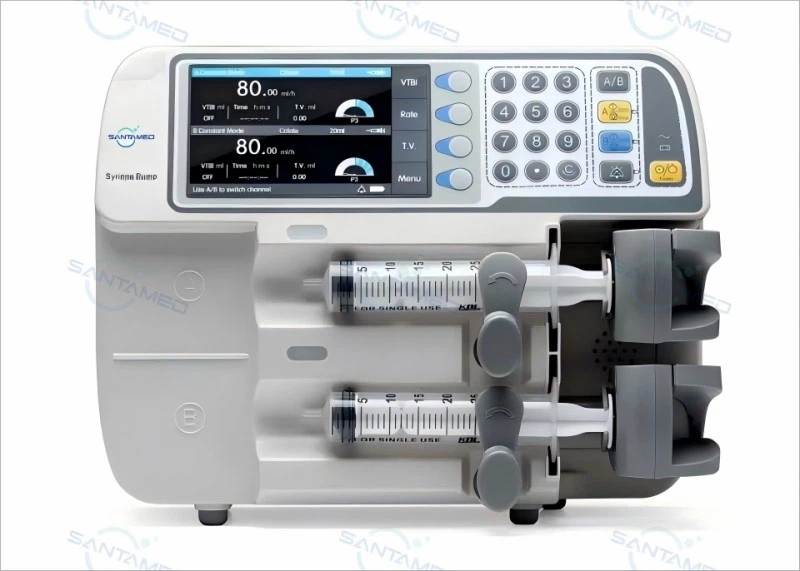
Never leave the syringe pump unattended during operation, especially if it's delivering a critical medication. Monitor the pump regularly to ensure it's working correctly. If you notice any abnormal noises, vibrations, or error messages on the display, stop the pump immediately and consult the user manual or contact technical support.
Contact for Purchase and Consultation
If you're interested in getting your hands on a high - quality syringe pump or have any questions about programming or using them, feel free to reach out to us. We're here to help you find the perfect syringe pump for your needs and provide all the support you need during the programming and operation process.
References
- Syringe Pump User Manuals
- Medical Literature on Fluid Delivery Systems
- Research Papers on the Accuracy of Syringe Pumps


